

Counter-Strike 1.6
Explore top Counter-Strike 1.6 resources: plugins, addons, maps, mods, skins, models and more. Download clean, optimized CS 1.6 files to upgrade your server and gameplay.
-
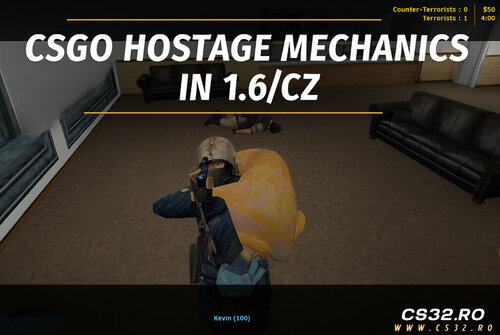 CS:GO Hostage Mode for CS 1.6 / CZ v1.3
Recreate Counter-Strike: Global Offensive’s hostage mechanics inside CS 1.6 and Condition Zero with realistic hostage carrying, rescue, and reward systems.
Requirements:
AMX Mod X 1.10+ (AMX 1.9 is no longer supported)
If compiled with AMX 1.9 → blank compile, no .amxx generated
Download AMX Mod X 1.10: AMXX 1.10 Download
Major Update v1.3 – Highlights
Hostage Back Model Fixed
Broken meshes (eyes, head parts) removed in 3rd person view
Pickup Cancel Bug Fixed
Cancelling hostage pickup now leaves the hostage in place instead of crawling after the player
Rescue Zone Cleanup
Hostages are fully removed from CT’s back after rescue and rewards are granted
Death Handling Improved
Hostages are dropped properly if the CT dies
Inventory Restore
Terrorists regain full weapons, ammo, and armor after hostage rescue round ends
Features
Hold USE key (E) for 2 seconds to pick up hostages
Carried hostages appear visually on CT’s back
Movement slows while carrying a hostage
Hostage becomes hidden while carried and reappears if dropped or player dies
Full drop-and-rescue logic; hostages reusable across rounds
CT rewards: $300 per picked-up hostage, $600 for all CTs if all hostages rescued
Round win condition based on minimum hostages rescued
Bot support: ZBot, PodBot, YaPB automatically carry and rescue hostages
Hostages cannot be damaged or killed
Progress bar during pickup & HUD icon for carried state
Compatible with official hostage maps (hostage_entity + func_hostage_rescue)
Installation
Place plugin:
addons/amxmodx/plugins/csgo_hostage_mode.amxx Enable plugin:
addons/amxmodx/configs/plugins.ini Add: csgo_hostage_mode.amxx
Place models in:
cstrike/models/csgo_hostage/ hostage.mdl
p_hostage_back.mdl
Restart the server or change map
CVARs
hostage_save_min "1" → Sets how many hostages need to be rescued to trigger a CT win
Compatibility
CS 1.6 and Condition Zero
Maps with hostage entities and rescue zones (cs_office, cs_italy, etc.)
Fully compatible with bots and standard AMXX servers
Files
csgo_hostage_mode_amxx_d4ca7.zip
By Leg02 0 -
 Random Player Models Plugin
Description:
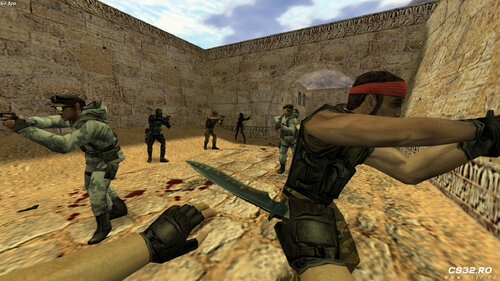
This plugin automatically randomizes player models every time a player respawns. Each respawn assigns a new random model, adding variety and fun to your server.
Installation
Place the Plugin
Copy the plugin file to your server’s cstrike/addons/amxmodx/plugins/ folder.
Enable the Plugin
Add the following line to addons/amxmodx/configs/plugins.ini:
random_pms.amxx Add Models
Place your custom player models in:
cstrike/models/player/custom_model/ Example files:
custom_ct_model.mdl custom_t_model.mdl Configure Model Paths
Edit the configuration files in:
addons/amxmodx/configs/random_models/ ct_models.ini – Add paths for Counter-Terrorist models.
t_models.ini – Add paths for Terrorist models.
Features
Randomizes player models on every respawn.
Supports custom models for both teams.
Easy to configure through .ini files.
Tips
Ensure all model files are correctly placed to prevent errors.
Mix different models to create a fun and unpredictable gameplay experience.
By Leg01 0 -
 Aim Realism v2.4.0
For Counter-Strike 1.6 and Condition Zero
The #1 Recoil & Accuracy Plugin
Overview
Aim Realism transforms your Counter-Strike weapons into realistic firearms, providing accurate bullet trajectories and authentic recoil behavior. Designed for both offline and online play, it works under all conditions—running, jumping, in-air, on ladders, in water, and even with sniper rifles without a scope.
This plugin also includes a BotProfile system for realistic bot behavior and customizable crosshairs.
Key Features
Realistic Weapon Behavior
Accurate bullets under all conditions.
Customizable weapon accuracy and recoil.
Shotgun pellets behave realistically.
Fixes CS engine’s bad shot registration.
Resolves inaccurate shooting for slow internet connections.
Fixes the bug requiring weapon switch to reset accuracy.
Corrects slow health updates in spectator mode.
BotProfile System
Includes all CS/CZ bots with 4 skill levels: Easy, Normal, Hard, Expert.
Bots act independently without unfair knowledge of player positions.
Scaled attack delays for each skill level.
Total of 210 bots with static skins preserved from original.
Better variation with 42 bots for each CZ player class.
Crosshairs & HUD
Fully customizable static and dynamic crosshairs.
Custom observer crosshairs for spectator mode.
Sniper crosshair visibility options.
Supports Half-Life crosshair designs via observer.txt and crosshairs.spr.
Adjust crosshair for FOV, sniper models, and scope modes.
Configurable via CVARs
Weapon Accuracy: aim_accuracy, aim_(weapon)_accuracy
Recoil Control: aim_recoil, aim_(weapon)_recoil
Crosshair Settings: aim__crosshairs, aim__standard_crosshair, aim__static_crosshair, aim__snipers_crosshair
Sniper Model Options: aim__sniper_allow_mdls, aim__sniper_cs_<CS/CZ>, aim__sniper_scope_mode
FOV Adjustment: aim__fov
BotProfile Characteristics
Skill Level Skill Value Attack Delay Description Easy 30 1.1 Beginner bots Normal 50 0.55 Intermediate bots Hard 70 0.275 Advanced bots Expert 90 0.1375 Expert bots Installation
Extract the files from the zip package.
Place all files in your CS 1.6 / CZ server directories.
Ensure AMX Mod X is installed.
Configure desired CVARs in plugins.ini or via the server console.
Customize crosshairs by editing crosshairs.spr and observer.txt if desired.
Additional Notes
Accuracy determines bullet direction relative to crosshair.
Recoil determines the shake of the weapon and affects crosshair movement.
Test with players to confirm real-life bullet placement; GoldSrc engine may occasionally misalign bullet holes.
Supports online and offline servers with full CS/CZ compatibility.
Included Files
aim_realism.sma – Full version with menus and features.
aim_realism_v240_accuracy_fix_.zip – Fixed accuracy version for servers where accuracy wasn’t working.
Requirements
AMX Mod X
Fully compatible with Counter-Strike 1.6 and Condition-Zero.
By Leg04 0 -
 Money Manager – v3.17
For Counter-Strike 1.6 & Condition Zero
Overview
Money Manager is a powerful replacement for the default CS money system, allowing server administrators to customize player earnings and weapon prices. With this plugin, you can control how much money players earn for kills, objectives, and round outcomes, providing flexible and balanced gameplay.
The plugin is fully optimized, lag-free, and supports team-based commands for both Terrorists and Counter-Terrorists.
Features
Kill Rewards: Set money for kills with variables for body/head shots, enemies/teammates, and VIP players.
Weapon-Specific Rewards: Assign different values for kills with specific weapons.
Round Rewards: Customize money for round wins or losses, optionally giving rewards only to survivors.
VIP Rewards: Define money for spawning as VIP and escaping.
Bomb Actions:
Money for planting, picking up, dropping, or attempting to defuse the bomb.
Rewards for exploding the bomb for both teams.
Hostage Rewards:
Money for killing, rescuing, or interacting with hostages.
Starting Money: Configure initial money for the first round and subsequent rounds.
Unlimited Money Options: Infinite or constant money with optional maximum limit removal (scu_unlimited_money).
Weapon & Item Pricing: Change weapon/item prices (autobuy/rebuy not supported).
Purchase Prevention: Block purchases for selected players.
VGUI Menu: Buy weapons at custom prices, even below default values.
Custom Configurations: Save and load all settings via config file.
Optimized Performance: Includes fixes for memory issues, kill money calculation, and client_buy plugin improvements.
Team-Based Commands: All commands apply separately to CTs and Ts.
Recent Updates (v3.17)
Bugfix: Fixed bots buying weapons when first-round money is set.
Improvement: Optimized kill money and weapon price systems.
Improvement: Client_buy plugin optimized, memory issue fixed.
New Feature: VGUI menu allows buying weapons below default prices.
Bugfix: Fixed miscellaneous issues and improved overall stability.
Requirements
AMX Mod X
Fully compatible with CS 1.6 and Condition Zero.
Included Files
money_manager_v317.zip
Config files and command menu for GUI usage
Benefits
Fully customizable money system
Works seamlessly with VIP systems and plugins
Prevents unfair money exploits
Enhances server gameplay balance
Easy-to-use GUI for quick configuration
By Leg01 0 -
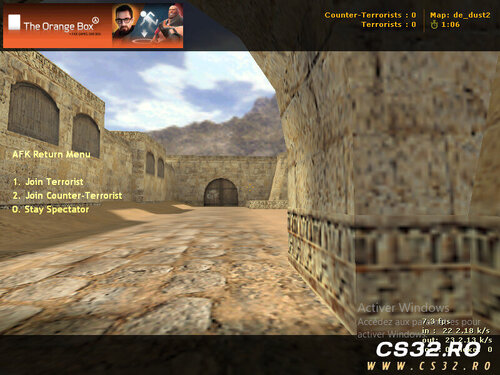 AFK Monitor Plugin – v1.0
Author: ITS_ZAKI
Overview
The AFK Monitor Plugin helps maintain active gameplay on your server by automatically detecting and managing inactive players. Players who remain idle for a set period are temporarily moved to the Spectator team, ensuring that active players enjoy uninterrupted rounds.
The plugin also includes an AFK Return Menu, allowing players to seamlessly rejoin the game when they are ready.
Features
AFK Detection: Monitors player movement and view angles to identify inactivity.
Automatic Spectator Transfer: Moves AFK players to the Spectator team after a configurable timeout (default: 15 seconds).
AFK Return Menu: Players can choose to rejoin the Terrorist, Counter-Terrorist, or stay in Spectator mode.
Full Team Support: Works with both T and CT teams.
Colorful Notifications: Displays clear, informative messages when a player is moved or returns.
Configuration
AFK Timeout: Default is 15 seconds (can be adjusted).
Custom Messages: Supports configurable messages for AFK actions.
Benefits
Keeps servers active and fair by minimizing idle players.
Simple and lightweight, with minimal server performance impact.
Enhances gameplay experience for active players.
Notes
Compatible with AMX Mod X based servers.
Works alongside most other team-based plugins.
By Leg00 0 -
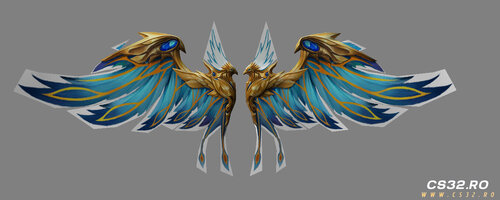 Eagle Wing Parachute
Counter-Strike 1.6
Overview
Tired of the standard parachute?
The Eagle Wing Parachute replaces it with giant, majestic eagle wings, giving players a powerful and mythical descent experience.
Ideal for Zombie Escape, Zombie Plague, and fun servers where unique visuals and atmosphere matter.
Features
Custom eagle-wing parachute model
Detailed feather design
Smooth, animated descent effect
Compatible with popular AMX Mod X parachute plugins
Optimized for CS 1.6 performance
Adds an epic and mythical feel to gameplay
Installation
Copy the model file into your:
cstrike/models/ Replace your default parachute model with the provided one.
Launch the game and enjoy flying like an eagle 🦅
📄 Note: Please read the included README for detailed installation steps, usage notes, and compatibility tips.
Included File
parachute_eagle.mdl
Credits
Model Edit & Compile: sp-saad
Feedback
Suggestions and improvement ideas are always welcome!
Support & More Information
For updates, support, official groups, and more models:
👉 https://guns.lol/sp_saad_rubio
By Leg00 0 -
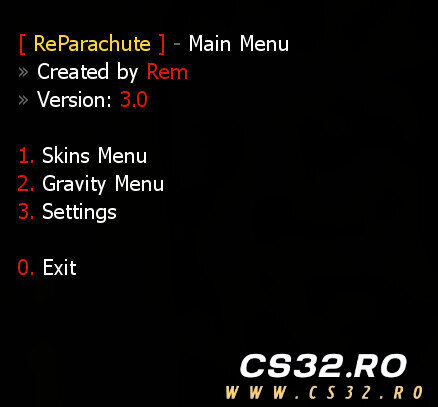 ReParachute – v3.0
Additions
Added new CVAR: reparachute_animations (0 / 1)
Added parachute animation system
Added model validation system
Full compatibility with Zombie Plague and other mods
Bug Fixes
Fixed gravity calculation issues
Fixed model loading crashes
Fixed menu navigation problems
Fixed memory leaks and general stability issues
Files
reparachute_e0bb5.zip
Description
ReParachute is a plugin that allows players to use parachutes with custom skins, animations, and gravity settings, offering a smooth and customizable experience for Counter-Strike 1.6 servers.
Available Versions
reparachute.sma
Full-featured version with menus, skins, gravity control, and permissions
reparachute_simple.sma
Lightweight version with basic parachute functionality
Features
Multiple parachute models with custom skins
Parachute animation support
Custom gravity settings (full version only)
Admin permission support for premium skins
Player settings saved via fvault
Team-based usage restrictions
Compatible with Zombie Plague and other mods
CVARs
CVAR Description reparachute_mode Usage mode: 0 Everyone, 1 Admin only, 2 Disabled reparachute_team Allowed team: 0 All, 1 Terrorists, 2 CTs reparachute_animations Enable animations: 0 Off, 1 On reparachute_skins_menu Enable skins menu (full version only) reparachute_gravity_menu Enable gravity menu (full version only) Commands
Command Description parachute_menu Opens the main menu say /parachute Opens the parachute menu say_team /parachute Opens the parachute menu parachute Opens the menu via chat Requirements
AMX Mod X 1.8.2+
ReAPI
CromChat
FVault
Status
Stable Optimized Ready for production servers Compatible with Zombie Plague & moreBy Leg00 0 -
 Halloween Decoration Pack
Counter-Strike 1.6
Overview
Celebrate Halloween on your Counter-Strike 1.6 server with this Halloween Decoration Pack, featuring custom-made models designed to add a spooky and festive atmosphere to your maps, events, and game modes.
Perfect for Zombie Mod (ZM), Zombie Escape (ZE), or any seasonal event.
Included Models
Pumpkin (Jack-o’-Lantern style)
Candy Bucket with:
Ghost
Bat
Mini pumpkin decorations
Empty Halloween Bucket
Ideal for map props or plugin-based effects
Usage Ideas
Decorate maps for Halloween-themed events
Use as collectible items in plugins
Integrate into Zombie Mod / Zombie Escape modes
Enhance custom game modes with a seasonal atmosphere
Installation
Extract the downloaded files.
Place the models into your:
cstrike/models/ Reference the models in:
Your map (via Hammer / editor)
Or your plugin configuration/code
Note: Please read the included README file for detailed installation steps, usage guidelines, and design notes.
Credits
Models & Textures: sp-saad
Tools Used:
Blender
MilkShape3D
Jed’s HLMV
Feedback
Suggestions, feedback, and improvement ideas are always welcome!
Support & More Information
For updates, support, official groups, and more models:
👉 https://guns.lol/sp_saad_rubio
By Leg02 0 -
 Zombie Escape Rebuild
Updates
v1.3 (Final Rebuild)
Released: 1 month ago
Bug fixes
Minor improvements and adjustments
Final version of the Rebuild branch
📦 File: zombie_escape_rebuild_13.7z
v1.2
Released: 4 months ago
Important Notice
Mod End-of-Life:
Development will officially stop on January 31, 2026.
What Is the Escapers-Zone Project?
The project was originally started by Raheem (raheem.1) and JaCk Gameplay as a classic Zombie Escape modification inspired by Dias’s Zombie Escape Mod, enhanced with additional features using the ReAPI Module.
Development continued until 2020, ending at version 1.6.
Later, Zombie Escape Rebuild was created as a highly improved and optimized version, designed to:
Deliver better performance
Support both Classic (Dias-style) and Modern gameplay (e.g. World War Z)
Offer extensive customization via CVARs and INI files
Provide a fully integrated platform containing most features servers may need
Mod Features
Core Features
Free & Open Source – Fully accessible and modifiable by the community
Easy Customization – Extensive settings via INI & CFG files
High Performance – Optimized using the ReAPI Module
Built on Escapers-Zone Core – Stable foundation since 2017
Full Compatibility – Supports ReHLDS & ReGameDLL_CS
Gameplay Systems
Gamemodes Manager
Escape
Nemesis
Swarm
Armageddon
Full API support
Human & Zombie Classes
Fully extendable via API
Nemesis & Survivor Support
Additional classes
Survivor disabled by default but fully supported
Items Manager
Level-based restrictions
Per-item and global limits
Coins System
Supports nVault, SQLite, and MySQL
Weapons Menu
Custom weapons supported (e.g. CSO weapons)
Visuals & Effects
Scoreboard enhancements
Infection effects
Weather system
HUD messages and indicators
Custom grenades:
Frost
Fire
Flare
Enhanced movement:
Long Jump (Nemesis / Zombies, API-supported)
Fully customizable HUD
Rich resource support:
Custom sounds
Models
Visual assets
Advanced & API
Inspired by Zombie Plague 5.0, modernized
Extensive API:
Forwards
Natives
Integration hooks
Multilingual support:
English (EN)
Polish (PL)
Turkish (TR)
Romanian (RO)
Sub Plug-Ins
Gameplay Plug-Ins:
Over 39 plug-ins and growing
Extra Items System:
Built from scratch using ReAPI Module
Help & Support
🌐 Forum: Escapers-Zone.NET
💬 Discord: Escapers-Zone
📱 Telegram: Escapers-Zone
Contributors
Special thanks to Raheem and JaCk Gameplay for the original mod and inspiration.
Additional contributors:
Maaysam, hUnT3r, LeviN, Clau, PunisheR, RaxerZ, Kyle WoodenMan, pm4b, crossDarks, LKING1543, Metro Addict (Death Valley), Kira (nom1n4L), Mr.Bully, MONIR, yRestrict, Dokke Mapper, Tom Tate, Wilian M., $1n (C.A.B.O.C.O.), 88fabricio88, ArN(I)1.95, bNNNNk, Lord._.Sh!va, Lucy Scan, MaHm0ud, man1ek, Mohcine, SeRious_SaM, spawN, Suzuki, Shams, ByVodka, NearjemSk, and the entire Escapers-Zone Dev Team.
❤️ Thank you to everyone who contributed code, ideas, testing, or feedback.
Requirements
Component Version Status Required AMX Mod X v1.10.0.5467 Enabled ✅ ReAPI Module v5.26.0.338 Enabled ✅ ReGameDLL_CS v5.28.0.756 Installed ✅ ReHLDS v3.14.0.587 Installed ✅ MetaMod-R v1.3.0.149 Installed RecommendedBy Leg02 0 -
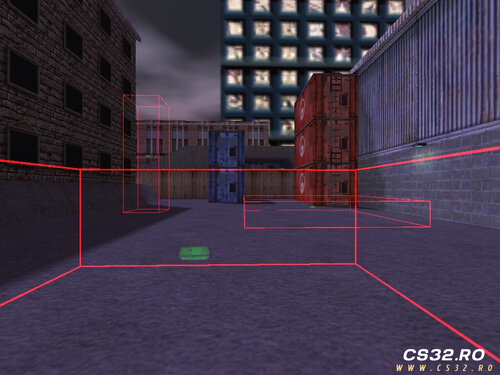 Bomb Site Control – v1.3
Description
Bomb Site Control gives server administrators full control over bomb sites in real time. You can create, remove, enable, or disable bomb sites during gameplay without modifying map files.
All custom bomb site locations and settings are saved automatically and loaded on every map start, ensuring consistent behavior across maps.
The plugin includes a configuration file:
configs/BombSite.ini This file allows you to manage key options such as:
Enabling bomb sites on all maps (not only de_ maps)
Controlling radar visibility of bomb sites
General bomb site behavior and display settings
Commands
Command Description say /bs Opens the Bomb Site menu say_team /bs Opens the Bomb Site menu say /bombsite Opens the Bomb Site menu say_team /bombsite Opens the Bomb Site menu bs_reload Reloads the configuration file bombsite_reload Reloads the configuration file Key Features
Create bomb sites dynamically during gameplay
Remove or toggle bomb sites in real time
Persistent bomb site storage per map
Automatic loading on map start
Bomb sites usable on any map or game mode
Custom radar visibility control per team
Visual bomb site indicators using C4 HUD sprites
Changelog
v1.0
Initial release
v1.1
Optimized code for better performance
Bomb sites can be expanded without being blocked by map geometry
Replaced decal drawing with a C4 HUD sprite for clearer indication
Enabled plantable C4 on all maps and modes
v1.2
Bomb site sprite color now reflects site state
Radar visibility can be configured for:
Terrorists
Counter-Terrorists
Both teams
Disabled
v1.3
Added independent axis scaling for precise site resizing
Added Add / Remove mode toggle for better control
Introduced scaling factor control for fine adjustments
Added noclip mode for easier bomb site placement
Download
Bomb Site Control v1.3
By Leg01 0 -
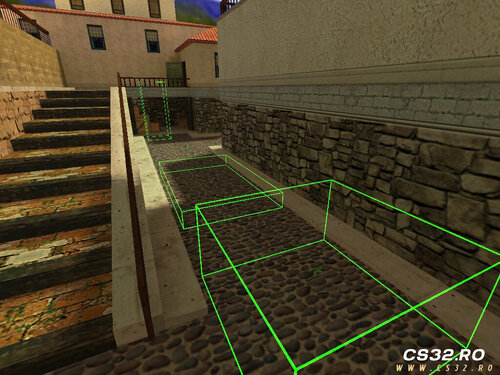 Buy Zone Control – v1.1
Description
Buy Zone Control allows server administrators to fully manage Buy Zones in real time. You can create, remove, enable, or disable Buy Zones during gameplay without editing maps.
Custom Buy Zone locations are saved automatically and reloaded on every map start, ensuring persistent behavior across map changes.
The plugin includes a configuration file:
configs/BuyZone.ini This file allows you to adjust core settings such as:
Keeping or removing default Buy Zones
Showing or hiding custom Buy Zones on the radar
Commands
Command Description say /bz Opens the Buy Zone menu say_team /bz Opens the Buy Zone menu say /buyzone Opens the Buy Zone menu say_team /buyzone Opens the Buy Zone menu bz_reload Reloads the configuration file buyzone_reload Reloads the configuration file Key Features
Create Buy Zones dynamically during gameplay
Remove or toggle Buy Zones on the fly
Persistent storage of custom Buy Zone locations
Automatic loading on map start
Configurable handling of default Buy Zones
Optional radar visibility for custom zones
Changelog
v1.0
Initial release
v1.1
Added independent axis scaling for precise zone resizing
Added Add / Remove mode toggle for better control
Introduced scaling factor control for accurate box adjustments
Added noclip mode for players placing Buy Zones, allowing easier positioning
Download
Buy Zone Control v1.1
By Leg00 0 -
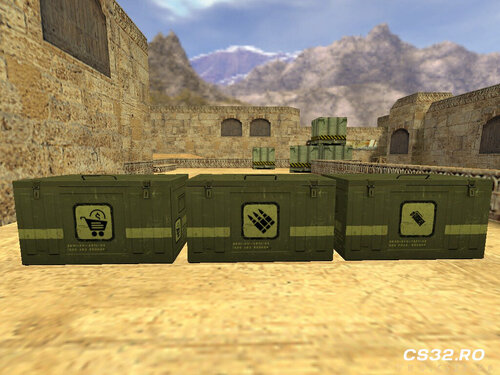 Supply Crate System
Description
This plugin adds a fully customizable Supply Crate system that allows players to deploy and interact with different crate types via an in-game menu.
Available crate types include:
Ammo Crates – supply ammunition
Grenade Crates – supply grenades
Market Crates – sell items for rewards
All crates are highly configurable, allowing server owners to fine-tune capacity, behavior, cooldowns, refill logic, team access, and more.
Players interact with crates by pressing E (IN_USE) while within the distance defined by g_eSetting[SETTING_CRATE_RANGE].
Commands
Command Description say /sc Opens the Supply Crates menu say_team /sc Opens the Supply Crates menu say /supplycrate Opens the Supply Crates menu say_team /supplycrate Opens the Supply Crates menu sc_reload Reloads the configuration file supplycrate_reload Reloads the configuration file Configuration
To create a custom crate, add a new entry in:
configs/SupplyCrate.ini Crate Configuration Format
[Crate Name]
CRATE_MODEL = Model path of the crate
CRATE_CLASS = 0 - Ammo Crate
1 - Grenades Crate
2 - Market Crate
CRATE_TEAM = 0 - Disabled
1 - Terrorist only
2 - CT only
3 - Both teams
CRATE_MODE =
Armor Crates: a - Vest
b - Vest + Helmet
Ammo Crates: c - Ammo
Grenade Crates: c - HE
d - Flashbang 1
e - Flashbang 2
f - Smoke
CRATE_FLAGS = a - Breakable
b - Explosive
CRATE_SOUND_FLAGS = a - Placement sound
b - Use sound
c - Empty sound
d - Remove sound
e - Sell sound
f - Supply sound
g - Refill sound
CRATE_COOLDOWN = Cooldown (seconds) between uses
CRATE_CAPACITY = Maximum supply amount
CRATE_REFILL = Refill delay in seconds (-1 = disabled)
CRATE_DELAY = Activation delay after placement or round start
CRATE_HEALTH = Crate health (default: 250)
CRATE_ARMOR = Armor supplied (default: 100)
CRATE_FACTOR = Scaling factor for ammo supply and market selling
CRATE_FACTOR_MAX = Maximum scaling limit for ammo crates
CRATE_SPAWN_CHANCE = Respawn probability (0.0 = never, 1.0 = always)
CRATE_EXPLODE_DAMAGE = Explosion damage (default: 100)
CRATE_EXPLODE_RADIUS = Explosion radius (default: 150)
CRATE_WEAPON_MODE = 0 - Allow all weapons
1 - Allow listed weapons
2 - Block listed weapons
CRATE_WEAPON_LIST = Weapon list used for filtering
Changelog
v1.0
Initial release
v2.0
Major rework with performance improvements
Improved crate placement (better alignment with ground & walls)
Crate refill system added
Activation delay after round start
Crates can break or explode when damaged
CRATE_FACTOR introduced for ammo scaling
v2.1
Added team-restricted crates (T / CT / Both / Disabled)
Added respawn chance for destroyed crates
Improved rendering logic
v2.2
CRATE_MODE switched to bitflags for cleaner multi-option support
CRATE_FACTOR now applies to grenade crates
Added CRATE_FACTOR_MAX for ammo crates
v2.3
Added weapon interaction filtering
Precached metal break sounds and gibs for maps without native support
Download
Supply Crate v2.3
By Leg01 0 -
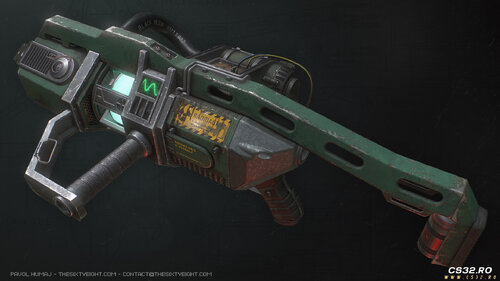 Displacer Cannon (XV11382)
Half-Life: Opposing Force → Counter-Strike 1.6 (Zombie Mod)
Overview
This plugin ports the Displacer Cannon from Half-Life: Opposing Force into Counter-Strike 1.6, fully adapted and balanced for Zombie Mod gameplay.
Credits
Original Plugin (HL1): KORD_12.7
CS 1.6 ZM Port & Modifications:
sp_half | Itz_saad (SP-TEAM)
Features & Updates
Availability
Weapon available via the Extra Items Menu
(Planned) Exclusive access for SVIP users
Primary Attack (Attack1)
Fires an energy projectile
Teleports the targeted Zombie or Human to a random safe location
Useful for:
Escaping zombie traps
Disrupting zombie formations
Friendly-fire protected
Secondary Attack (Attack2 / Alternate)
Creates a portal behind the player
Teleports the player to a valid spawn point
Deals area damage to nearby zombies:
At the teleport origin
At the destination
Includes:
1.24-second charge delay
Sound effect: displacer_spin2.wav
Weapon Mechanics
Charging System: 3 shots per charge
Cooldown: 120 seconds
Smart alerts at 60s and 15s
Charge notification spam limited to 3 messages
Charges auto-reset when available
Balance Restrictions
Normal Players
Max 3 buyers per round
Only allowed if ≥ 9 zombies
VIP / Admin
Max 2 buyers per round
Designed to maintain fair and competitive ZM gameplay
Quality & Stability
Clean, colored chat messages for clear feedback
Fully stabilized for smooth gameplay
Fixed negative timer issues
Optimized for Zombie Mod environments
Suggested Testing Checklist
Purchase Test
Buy as Human
Verify weapon model and sounds
Primary Attack Test
Fire at zombies
Confirm teleport, effects, and no ally damage
Secondary Attack Test
Teleport from safe areas
Ensure valid spawn selection and zombie damage at both points
Status
✔ Ready for server deployment
✔ Optimized for Zombie Mod gameplay
Support & More
For updates, support, official groups, and additional models:
https://guns.lol/sp_saad_rubio
By Leg00 0 -
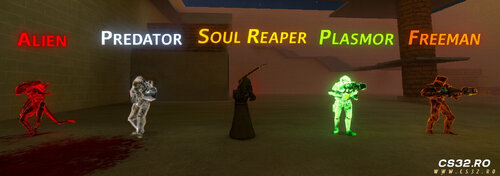
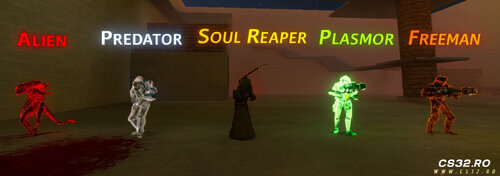 Zombie Plague 4.4 Chronicles – V3 (Previous)
Core Features
Added fully functional bosses:
Predator
Alien
Soulreaper
Plasmor
Freeman (Survivor-based)
Fixed Global Share bug — all extra items are now per-player.
Zombie damage is now configurable via ZombiePlague.cfg.
Bot Enhancements
Bots can:
Use Predator & Alien abilities
Deal consistent damage
Destroy tripmines
Buy extra items (zp_bots.ini)
Buy-class logic restricted to pre-mode only.
VIP System Expansion
Fire immunity
Configurable:
Speed
HP
Gravity
+1 Jump
All settings managed via zm_vip.cfg.
Boss Abilities
Predator:
G → Invisibility (6s duration / 12s cooldown)
Alien:
R → Slows enemies by 70% for 5s
Plasmor:
Plasma Rifle with fixed visuals, damage, HUD, and beam sync
Freeman:
Laser Minigun with stable damage and synced beam
Soulreaper:
New model & sounds + automatic darkness effect
Game Modes
Multi-Infection
Swarm
Nightmare
Progression Systems
Rank / Level / XP system with 30+ levels
Souls Shop:
1 soul per kill
Trade souls for Ammo Packs
HUD Improvements:
Current mode display
Animated Humans/Zombies counter
Models & Visuals
Humans: HL2 Metro Cops
Zombies: Zombified Metro Cops
VIP Zombie: Yautja (Red Predator)
Animated win sprites:
Humans Win → Blue
Zombies Win → Red
Light red/pink fog for atmosphere
Melee Weapons
Bloody Pipe (animated)
Bloody Axe
Crowbar (HD)
Kunai (VIP)
Audio & UI
New radio voice lines
Extended ambient & boss sounds
Refreshed game menu
Redesigned /top15 and /info MOTDs
Improved chat UI with level display
Fixes & Improvements
Fixed knife damage bug causing insane zombie damage
Balanced knife speed & gravity
Removed hidden core warnings
Admin actions locked after round start
Admin menu split into 4 sections
Notes
Recommended to use Register/Login plugin
(Progress saved by nickname, not SteamID/IP)
AMXX 1.8.0+ supported
VIP weapons limited to 1 per round automatically
Extra Item restrictions configurable via zp_extraitems.ini
Credits
Mercylezz – Zombie Plague creator
Rahim-Kira – Pawn & plugin support
ROKronoS – Shade version creator
Jc980 – VIP model
By Leg08 0 -
 I’ve created three new Christmas hat models. Each model includes color-coded variants: red for the T team, blue for the CT team, and green as the original version. These models are fully ready for server use and will add a festive touch to the gameplay.
By Leg00 0 -
 Xmas-Themed Ghost Entity Plugin
This plugin spawns a festive ghost entity whenever a player dies, adding a spooky yet seasonal touch to your server. Originally based on the work by steelzzz, this version has been revamped with a special Christmas theme, featuring custom ghost models and enhanced configurability.
Key Features:
Ghost Spawns on Player Death: Whenever a player meets their demise, a ghost entity materializes to haunt the area.
Festive Xmas Ghost Model: The ghost model has been reworked to fit the holiday spirit with a unique Christmas-themed design. (models/sp_sky_ghost_xmas_v1.mdl)
Customizable Lifetime: Adjust how long the ghost stays around before vanishing.
Adjustable Speed & Rotation: Fine-tune the ghost's movement to match the spooky vibe you're aiming for.
Easy Server Integration: Simple to install and integrate into your server, with clear configuration options for quick setup.
Bring some holiday cheer (or a little fear!) to your server with this fun and festive plugin!
By Leg05 0 -
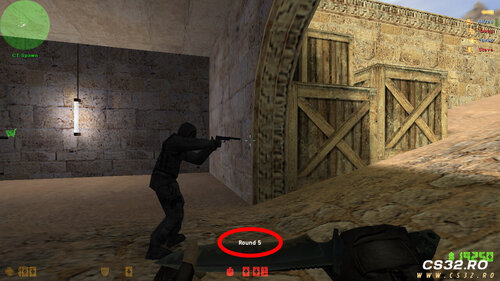 Round Manager for CS 1.6 (GoldSrc)
A powerful and fully configurable round management system for Counter-Strike 1.6 servers.
Automatically tracks rounds, scores, provides HUD/chat notifications, and includes VOX announcements.
Key Features
✔ Automatic round tracking
✔ Score monitoring (Terrorists vs. CTs)
✔ Chat + HUD Notifications
✔ VOX announcements using the Half-Life voice system
✔ Player command: say rounds
✔ Admin command: rm_set_round
✔ Native API for developers
✔ Multilingual support
✔ Highly customizable via CVars
✔ Admin activity logging
Display Modes
Mode 0
Chat: Round: 5 / 30
HUD: Round 5
Mode 1
Chat: Rounds Left: 25 / 30
HUD: 25 rounds
Native Functions (For Developers)
rm_get_round() — current round
rm_get_rounds_left() — rounds remaining
rm_get_max_rounds() — returns mp_maxrounds
rm_get_t_score() — Terrorists score
rm_get_ct_score() — CT score
Commands
Players
say rounds
say_team rounds
→ Shows current round information
Admins
rm_set_round
Permissions: ADMIN_RCON
Sets the round number manually
CVars
CVar Description Default rm_enabled Enable/disable plugin 1 rm_type Display mode (0 = current round, 1 = rounds left) 0 rm_announce_enabled Auto-announce rounds 1 rm_vox_sound_enabled Enable VOX audio 1 rm_show_activity Admin activity visibility 2 rm_log_commands Log admin commands 1 Included Files
round_manager.amxx — compiled plugin
round_manager.sma — source code
round_manager.inc — developer include
round_manager.txt — language dictionary
round_manager.cfg — configuration file
Requirements
AMX Mod X 1.8.2+
Sound Helper plugin / module
Note
Please keep discussions respectful.
Constructive feedback and suggestions are appreciated!
By CS322 0 -
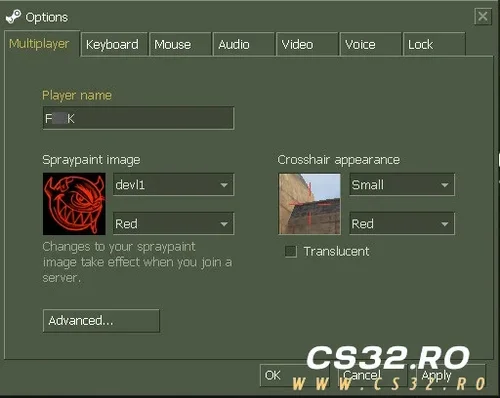 Bad Name Filter Plugin for Counter-Strike 1.6 – Automatically Replace Offensive Player Names
The Bad Name Filter Plugin for CS 1.6 is a lightweight and essential AMX Mod X addon that keeps your server clean and professional by automatically changing player names that contain inappropriate, offensive, or sexual words. This ensures a safer and more respectful environment for all players.
Key Features
Automatic Detection of Bad Words
The plugin scans all player names upon joining and during gameplay. If a name contains banned or offensive terms, it will be instantly replaced.
Instant Name Replacement
Any detected bad name is automatically changed to the default replacement name:
“BadName”
(This value can be customized.)
Fully Customizable Word List
You can add, remove, or edit forbidden words directly from the configuration file.
Add any insult, sexual word, racist word, or abusive term
Supports unlimited entries
Easy to manage and update
Server-Safe & Community-Friendly
Prevents players from using inappropriate names that can disturb others or violate community rules.
Lightweight & Efficient
Works smoothly on all AMX Mod X versions (1.8.2 or higher) without impacting performance.
Why Install the Bad Name Filter Plugin?
Keeps your server clean and professional
Prevents toxicity and offensive player identities
Easy setup and fully configurable
Protects younger audiences from inappropriate content
Compatible with all CS 1.6 mods and server types
By CS320 0 -
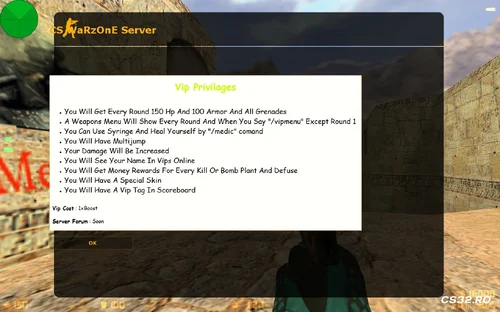 Ultimate VIP Pack for Counter-Strike 1.6 – 11 Premium AMX Mod X Plugins in One
The Ultimate VIP Pack is the most complete VIP plugin collection for CS 1.6, designed to provide VIP players with exclusive features, rewards, and enhancements. This pack combines 11 fully integrated plugins, giving your VIP members a superior experience while maintaining full compatibility with AMX Mod X servers.
This pack was carefully crafted and required advanced knowledge of AMX Mod X development, providing a professional and polished VIP system (except the VIP tag, which is standard).
Included Plugins & Features
Ultimate VIP Menu
Displays automatically every round (except Round 1)
Can also be opened via /vipmenu
Choosing any item automatically drops your weapons
Separate menus for CT and T:
CT Menu includes Defuse Kit with every item
T Menu provides standard items
Ultimate VIP Skin
Automatically equips VIP skin every round on spawn
Ultimate VIP Tag
Shows VIP tag on scoreboard (not constantly visible)
Ultimate VIPs Online
Type /vips to see all online VIPs in chat and console
Displays “No VIPs Online” if none are active
Ultimate VIP Increased Damage
VIPs deal extra damage to other players
Fully configurable via CVAR
Ultimate VIP Info in MOTD
Displays VIP privileges in MOTD when typing /vipinfo
Supports custom forum link or server name
Ultimate VIP Privileges
Grants 150 HP, 100 AP, and all grenades every round
HP/AP amounts fully configurable via CVAR
Ultimate VIP Multijump
Enables multi-jump abilities
Maximum jumps configurable via CVAR
Ultimate VIP Medic
Type /medic to heal 35 HP with syringe animation
Configurable healing amount and max HP limit
Ultimate VIP Rewards
Earn $1500 per kill
Earn $700 per bomb plant/defuse
Ultimate VIP Additional Bonuses
Fully customizable CVARs for all features
Compatible with all CS 1.6 modes (Deathmatch, Furien, BaseBuilder, Public, etc.)
Requirements
AMX Mod X 1.8.2 or higher
MetaHook/MetaDrawer for HUD-related features (if applicable)
Lela Stocks included in the Include folder of the pack
Why Choose the Ultimate VIP Pack?
All-in-one VIP solution with 11 advanced plugins
Enhances gameplay for VIP members with skins, rewards, and custom features
Fully configurable via CVARs to suit your server style
Lightweight, stable, and optimized for performance
Ideal for competitive, public, or private CS 1.6 servers
By CS327 0 -
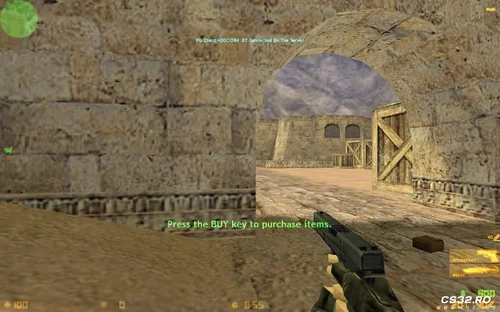 VIP Welcome Message HUD Plugin for Counter-Strike 1.6 – Highlight Your VIP Players with Stylish On-Screen Announcements
The VIP Welcome Message HUD Plugin for CS 1.6 is a lightweight and visually impressive AMX Mod X addon that displays a special on-screen notification whenever a VIP player joins the server. This feature helps recognize VIP members instantly and adds a more professional, premium feel to your CS 1.6 server.
Key Features
Dynamic HUD Welcome Message
When a VIP player connects to the server, all players see a clean and colorful HUD message displaying the VIP’s name.
Example:
“VIP Player: PlayerName has joined the server!”
Works Automatically
The plugin detects VIP players instantly and broadcasts the message without requiring any commands.
Enhanced Visual Style
Uses HUD positioning, clean font colors, and smooth display effects to make the message visible without disturbing gameplay.
Lightweight & High Compatibility
Designed for AMX Mod X 1.8.2 or newer, ensuring full stability and zero performance impact on your server.
Why Use the VIP Welcome Message HUD Plugin?
Makes your VIP players feel valued and recognized
Improves community engagement and server professionalism
Encourages players to purchase VIP by visibly promoting VIP status
Compatible with all VIP systems & existing server plugins
Fully customizable message, colors, and HUD position
Perfect for Any CS 1.6 Server
Whether you run a Public, Furien, Deathmatch, BaseBuilder, or Classic server, this plugin works flawlessly and boosts your server’s premium appearance.
By CS320 0 -
 Resetscore Color Plugin for Counter-Strike 1.6 – Advanced Reset Score System with Color Messages
The Resetscore Color Plugin for CS 1.6 is a lightweight and essential AMX Mod X addon that allows players to reset their in-game score instantly using simple chat commands. Designed with colored messages and improved visibility, this plugin enhances gameplay fairness and provides a cleaner scoreboard experience, especially on competitive or public servers.
Key Features
Instant Score Reset
Players can quickly reset their score at any time by typing:
/rs, rs, or /resetscore in chat.
Colored Chat Notifications
Every time a player resets their score, the plugin displays a colorful, eye-catching message that is visible to all players. This improves transparency during gameplay and keeps the action more organized.
User-Friendly Commands
Supports multiple variants of the command for maximum convenience:
/rs
/resetscore
rs
Perfect for Public & Competitive Servers
Helps reduce frustration for players who join late or start with a bad score. Ideal for servers that focus on balanced gameplay and a positive experience.
AMX Mod X Compatibility
This plugin requires AMX Mod X 1.8.2 or newer, guaranteeing full stability and compatibility with modern server configurations.
Why Install the Resetscore Color Plugin?
Simple and fast installation
Clean, modern, and colorful chat messages
Encourages fair gameplay
Works on ALL CS 1.6 game modes (Public, Deathmatch, Furien, BaseBuilder, and more)
Extremely lightweight — no performance impact on the server
By CS322 0 -
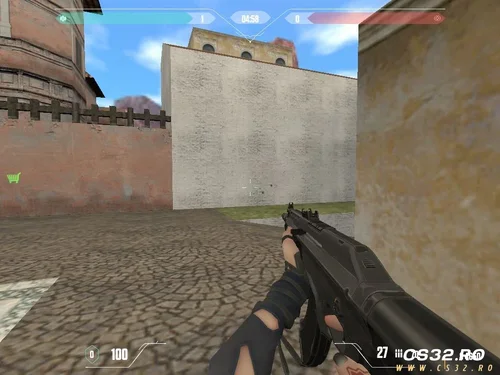 Valorant HUD Plugin for Counter-Strike 1.6 – Advanced Features & Requirements
The Valorant HUD Plugin for CS 1.6 is a high-quality AMX Mod X extension designed to replicate the clean and modern Valorant-style interface inside Counter-Strike 1.6. This plugin enhances the visual experience of players by delivering a futuristic, competitive-grade HUD while maintaining full compatibility with classic CS 1.6 gameplay.
Key Features
Full MetaHook / MetaDrawer Integration
The plugin uses MetaHook and MetaDrawer modules to deliver advanced rendering capabilities. These components allow the HUD to display smooth animations, crisp UI elements, and high-performance visual effects similar to Valorant’s interface.
Optimized for 1024×768 Resolution
The plugin is specifically designed to work at 1024x768, one of the most stable and commonly used resolutions in Counter-Strike 1.6. All HUD elements are positioned perfectly for this aspect ratio, ensuring no misalignment or scaling issues.
AMX Mod X 1.8.2+ Required
To ensure full compatibility and stability, the plugin requires AMXMODX version 1.8.2 or higher. This guarantees proper support for modern natives, modules, and performance improvements required by MetaHook-based plugins.
Why Choose the Valorant HUD Plugin for CS 1.6?
Modern, stylish, competitive UI inspired by Valorant
Clean and responsive layout for better visibility
Enhanced player experience with a professional-grade interface
Compatible with most CS 1.6 servers running AMXX 1.8.2+
Ideal for servers focused on competitive play, modern gameplay design, or unique themed experiences
System & Server Requirements
Counter-Strike 1.6 Server (Steam or Non-Steam)
MetaHook / MetaDrawer installed and properly configured
AMX Mod X 1.8.2 or higher
Screen resolution set to 1024×768
By CS320 0 -
 Download CS 1.6 NextClient: Steam On
CS 1.6 NextClient is here to revolutionize the way you play Counter-Strike. This isn't just an update; it's a complete reimagining of the classic client, built for the modern era. Experience enhanced security, a customizable interface, and cutting-edge features that bridge the gap between nostalgia and today's gaming expectations. If you've been searching for a CS 1.6 new version that truly innovates, your search ends here.
🚀 Why NextClient is the Ultimate CS 1.6 Client in 2026
Built directly from the latest Steam version and packed with next-generation improvements, NextClient delivers on the long-awaited dreams of the global CS 1.6 community. It's designed for players who demand more from their classic shooter.
✨ Revolutionary Features of NextClient CS 1.6
🔒 Advanced Anti-Cheat & Security: A built-in, proactive security layer protects you from malicious files and common exploits, ensuring a fairer and safer gameplay environment on any server.
🎨 Fully Customizable Interface: Choose from multiple professional themes or create your own. Personalize the look and layout of your entire game client with a modern, user-friendly settings panel.
⚡ Lightning-Fast Resource Downloader (FastDL): Experience the fastest map and resource downloading system ever created for CS 1.6. Get into the game faster with an optimized, integrated download manager.
🌐 Enhanced Server Browser & Community Integration: Browse a curated, live-updated list of global servers with rich details. See Steam player avatars directly in the server list and scoreboard, adding a personal touch to the community.
🛠️ Performance & Stability Optimizations: Enjoy higher FPS stability, reduced input lag, and flawless compatibility with Windows 10 and Windows 11. NextClient runs smoother than any other client available.
📥 How to Install the New CS 1.6 NextClient
Download the installer from the official link below.
Run the setup file—it’s clean, safe, and free of bloatware.
Customize your client by selecting your preferred theme and adjusting settings.
Launch the game and connect to the next generation of CS 1.6.
System Requirements: Compatible with all modern Windows operating systems (Windows 7/8/10/11). Requires minimal storage space and runs efficiently on older hardware.
🎯 Who Should Download NextClient?
This client is the perfect choice for:
Competitive players who need maximum stability and security.
Server admins seeking a better-connected and visible community.
Everyday players tired of outdated clients and seeking a modern, feature-rich experience.
The entire CS 1.6 community ready to embrace the future of their favorite game.
Stop playing with outdated technology. Upgrade to CS 1.6 NextClient—the most powerful, secure, and visually modern version of Counter-Strike ever released. Experience the game you love, finally enhanced for today's world.
Download CS 1.6 NextClient – Free & Full Version
Below, you will find a step-by-step tutorial on how to complete the installation on your PC.
By CS3237 0 -
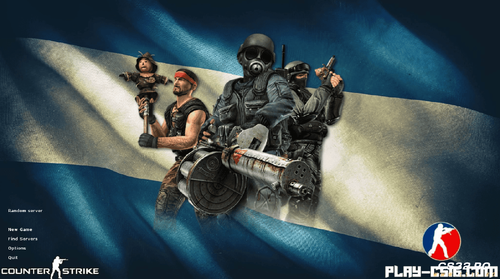 Download CS 1.6 Argentina Edition – The 2026 Upgrade for a Global Community
The classic just got a major upgrade. CS 1.6 Argentina Edition is here – a powerful, refined version built for modern gameplay while staying true to the legendary CS 1.6 spirit. While designed with the Argentine gaming community in mind, it delivers a smooth, secure, and visually enhanced experience for players worldwide.
This isn't just another fan-made mod. It's a complete overhaul that tackles the classic game's limitations. Think of it as CS 1.6 reimagined for today's players – faster, safer, and packed with visual improvements that don't break the iconic feel. The core tactical gameplay you love is all there, just polished to perfection.
What Makes This Version Different?
🎮 Visuals & Immersion:
High-Quality Skins & Models: Get updated weapon textures and player models for a fresher, more detailed look.
Realistic Atmosphere: Enhanced sounds and visual effects create a more intense and engaging battle atmosphere.
Modern Interface: A completely redesigned main menu and in-game HUD for a clean, contemporary feel.
🛡️ Security & Performance:
Advanced Anti-Cheat Protection: Play with confidence. Our integrated system actively blocks common hacks and malicious server files.
Optimized Client: Built for stability, with faster loading times and seamless performance on Windows 7, 8, 10, and 11.
Clean Servers: Connect to a curated list of popular, well-maintained global servers. No more wasted time on laggy or compromised connections.
⚙️ Experience & Polish:
Crisp, Updated Sounds: Experience gunfire, footsteps, and in-game audio with greater clarity.
Intuitive Setup: A straightforward installer gets you from download to matchmaking in minutes.
Pure Gameplay: No unwanted bloatware, ads, or performance-draining extras. Just the game, perfected.
Who Is This Edition For?
Veteran Players tired of outdated graphics and security risks in the original client.
New Players wanting to experience the legendary CS 1.6 in its most accessible, modern form.
Players in Argentina looking for the best local performance and community integration.
Anyone seeking a smooth, hassle-free, and visually updated take on a timeless FPS.
Stop dealing with unstable mods, security worries, or outdated visuals. CS 1.6 Argentina Editiondelivers the definitive 2025 CS 1.6 experience. Download it now and see why the classic still reigns supreme.
Download CS 1.6 Argentina Edition – Free & Full Version
Do you have issues with downloading and installation? You can find the solution here ↓
By CS3238 0 -
 Download the CS 1.6 Mix (eP) 4 Alive version for free and enjoy a clean, fast and fully optimized Counter-Strike 1.6 experience on your PC. This edition delivers classic CS 1.6 gameplay with improved performance, stable high FPS, and quick connectivity to servers worldwide. Play legendary maps such as de_dust2, de_inferno, de_nuke, and cs_assault, join competitive MIX matches, or team up with friends for smooth online sessions.
The installer is lightweight, secure, and compatible with all modern Windows systems (Windows 7, 8, 10, and 11). Get CS 1.6 Mix (eP) 4 Alive now and enjoy a lag-free, enhanced gaming experience designed for both casual and competitive players.
Attention: The CS 1.6 Mix (eP) 4 Alive version has been fully tested and scanned with the latest antivirus technology to ensure safety. However, during installation, you may encounter a Windows SmartScreen security prompt.
This is a standard Windows notification and can be safely ignored in order to continue the installation.
Below, you will find a step-by-step tutorial on how to complete the installation on your PC.
By CS3243 1
-
New Counter-Strike 1.6
-
Blogs
-

 Latest Entry
Download CS 1.6 ESWC

Download CS 1.6 ESWC Edition — Competitive Counter-Strike 1.6 for PC
The Electronic Sports World Cup experience: optimized models, improved textures, and low-ping config — free for Windows 10 & 11.
🛡️ Antivirus Scanned ✅ Trusted & Verified 🔒 100% Safe 🚫 No Malware ⚡ Clean Build🛡️ ANTIVIRUS SCANNED & TRUSTED — 100% SAFE
⚠️ Note: The CS 1.6 ESWC Edition has been fully tested and scanned with the latest antivirus technology. During installation, you may encounter a Windows SmartScreen prompt — this is a standard Windows notification for less common files and can be safely ignored.
Below is a step-by-step installation tutorial:
What is CS 1.6 ESWC Edition?
CS 1.6 ESWC is a special edition of the legendary Counter-Strike 1.6, built for players who want to experience the atmosphere of professional ESWC (Electronic Sports World Cup) competitions. This version keeps the original gameplay mechanics intact while adding visual and performance improvements that make it ideal for both practice and serious matches.
Compared to the classic release, CS 1.6 ESWC includes optimized player models, improved textures for weapons and maps, and a modernized GUI that follows competitive standards. The default configuration is also tuned for low ping and stable FPS, giving you a clear edge in online battles.
Why Download CS 1.6 ESWC?
🎯 ESWC Competitive GUI
Modernized interface following international tournament standards.
🧍 Optimized Player Models
Refined Terrorist and CT skins for maximum visibility.
🔫 Improved Textures
Higher quality weapon & map visuals without sacrificing FPS.
📡 Low-Ping Config
Pre-tuned rate, cl_cmdrate and cl_updaterate values.
⚡ Stable FPS
Optimized for 100+ FPS on widescreen (16:9, 16:10).
🛡️ Anti-Slowhack
Full read-only protection against rogue server scripts.
🤖 Integrated zBots
Practice offline against AI bots with adjustable difficulty.
🌐 Working Masterserver
Browse thousands of ESWC-style servers worldwide.
Download CS 1.6 ESWC
Choose your preferred download method
Build: ESWC Competitive Edition · Size: ~260 MB · 100% Virus-Free
Technical Specifications
Gallery — CS 1.6 ESWC in Action
Authentic gameplay screenshots showing the ESWC red/blue player models, competitive maps, and modernized interface:
ESWC-style red and blue player models optimized for competitive visibility.
Classic competitive gameplay with ESWC optimized textures.
Modernized ESWC GUI following international competitive standards.
ESWC vs. Classic CS 1.6
System Requirements
Recommended Console Commands
For optimal hit registration on ESWC-style servers, open the console (
~) and apply:rate 100000 cl_cmdrate 105 cl_updaterate 102 ex_interp 0.01 fps_max 99.5 m_rawinput 1 cl_crosshair_size "medium" cl_crosshair_color "0 255 0"
How to Install CS 1.6 ESWC — Step by Step
- Download: Click the Direct Download (.exe) or the Torrent Download (.torrent) link.
- Run Setup: Open the downloaded file to launch the setup wizard.
-
Choose Path: Select your preferred folder (e.g.,
C:\Games\CS16_ESWC). - Desktop Shortcut: Keep the checkbox checked for fast access.
- Play: Launch the game, set your resolution under Options > Video, and join your favorite ESWC servers.
Frequently Asked Questions
Is CS 1.6 ESWC free to download?
Yes, this release is 100% free to download, install, and play both online and offline.
What makes ESWC different from classic CS 1.6?
The ESWC Edition includes optimized player models, improved textures, a modernized GUI, and a competitive low-ping configuration — all while keeping the original gameplay mechanics intact.
Can I play on regular CS 1.6 servers?
Yes! The client supports Dual Protocol 47/48, so you can connect to both ESWC-style and standard public servers.
Is this version safe from malware?
Absolutely. The client is clean, virus-checked, and fortified with read-only file protection against malicious server scripts.
Ready to Play CS 1.6 ESWC?
Download now and experience the tournament atmosphere.
- Read more...
- 0 comments
-