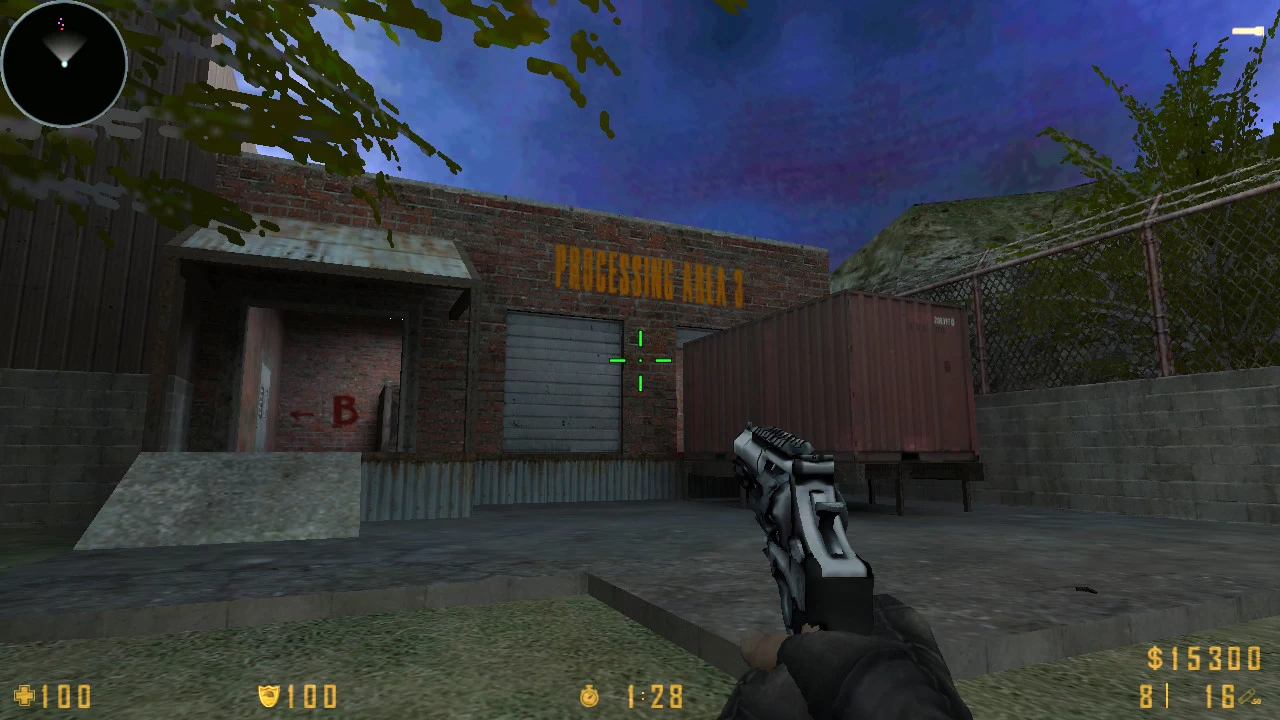




Counter-Strike 1.6
Explore top Counter-Strike 1.6 resources: plugins, addons, maps, mods, skins, models and more. Download clean, optimized CS 1.6 files to upgrade your server and gameplay.
-
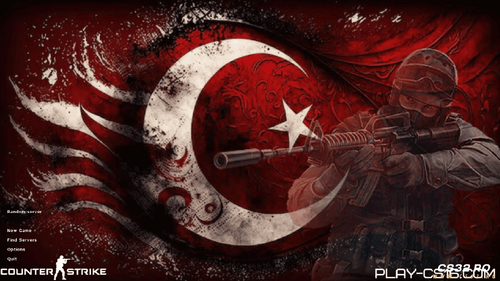 Download CS 1.6 Turkey Edition – The Ultimate Turkish-Themed Counter-Strike
Experience the legendary Counter-Strike 1.6 in a whole new way. The CS 1.6 Turkey Edition is here – a special version packed with exclusive Turkish-themed content, performance upgrades, and visual improvements. This isn't just another fan mod; it's a tribute to the dedicated Turkish gaming community, offering a fresh, immersive way to play the world's most iconic tactical shooter.
If you're looking for a way to revitalize your CS 1.6 experience with national pride and modern polish, this download is for you.
What's New in the CS 1.6 Turkey Edition?
🎨 Immersive Turkish Theme:
Patriotic Design: The moment you launch the game, you're greeted with a stunning main menu featuring Turkish flag art and a bold red color scheme.
National Anthem Soundtrack: Enjoy a tastefully remixed, atmospheric version of the Turkish National Anthem as part of the new menu soundtrack.
HD Visual Overhaul: All standard maps like de_dust2 and cs_italy have been revitalized with updated, high-definition textures. The classic game now looks sharper and more modern than ever.
⚙️ Enhanced Gameplay & Performance:
Optimized for Modern PCs: This edition is tuned for stability and smooth FPS, ensuring flawless gameplay on Windows 10 and Windows 11.
Clean & Secure: A safe download, free from malware, unwanted programs, or bloatware. Just the pure, enhanced game.
Full Online & Offline Play: Jump into the vibrant Turkish server community or practice with bots offline.
Why to Download CS 1.6 Turkey Edition?
For Turkish Players: Play Counter-Strike 1.6 with an interface that feels like home, celebrating national pride within the game.
For All CS 1.6 Fans: Discover a visually refreshed take on the classic. The HD textures breathe new life into familiar battlegrounds.
Easy Setup: A simple installer gets you from download to gameplay in just a few clicks.
Stop playing the same old version. Download CS 1.6 Turkey Edition today – the perfect blend of classic Counter-Strike 1.6 gameplay and a powerful Turkish-themed makeover. Join the servers and see the difference.
Download CS 1.6 Turkey Edition – Free & Full Version
Do you have issues with downloading and installation? You can find the solution here ↓
By CS3241 0 -
 Download Cs 1.6 Romania – Versiunea Oficială pentru Jucătorii Români
Dacă îți dorești să descarci Counter-Strike 1.6 Romania într-o variantă stabilă, modernă și special adaptată pentru comunitatea din România, ai ajuns exact unde trebuie. Această ediție include elemente grafice românești, modele HD și o protecție anti-cheat solidă, oferindu-ți o experiență de joc sigură și plăcută.
De ce să alegi Counter-Strike 1.6 Romania?
✔ Tematică românească autentică – design inspirat din elemente naționale: steagul României, culori tematice și interfață personalizată.
✔ Arme și jucători în format HD – texturi mult mai clare și animații îmbunătățite.
✔ HUD modern și radar actualizat – o interfață curată, intuitivă, perfectă pentru meciuri rapide.
✔ Server Browser optimizat – găsești ușor servere românești active și bine administrate.
✔ Protecție anti-hack integrată – intri liniștit pe orice server, fără riscul de conflicte sau erori.
Caracteristici importante
Ultima versiune optimizată de CS 1.6 Romania – stabilă și adaptată pentru sistemele moderne.
Instalare foarte rapidă – în mai puțin de un minut ești gata de joc.
Compatibilitate totală cu Windows 10/11.
Boți inteligenți pentru antrenament – perfect pentru warm-up sau joc offline (comandă: H).
Viteză de descărcare fără limită – fișier curat, sigur și verificat.
Detalii avansate în scoreboard – avatar, HP, bani și alte informații afișate direct în joc.
Cum descarci Counter-Strike 1.6 Romania?
Apasă butonul de Download.
Rulează installerul și finalizează instalarea.
Intră pe un server românesc și începe meciul!
Vrei și alte versiuni?
Poți testa și:
CS 1.6 Original
CS 1.6 Clean Edition
Descarcă acum Counter-Strike 1.6 Romania și intră direct în acțiune!
Dacă întâmpini probleme la descărcare sau instalare, găsești toate soluțiile mai jos.
By CS3271 0 -
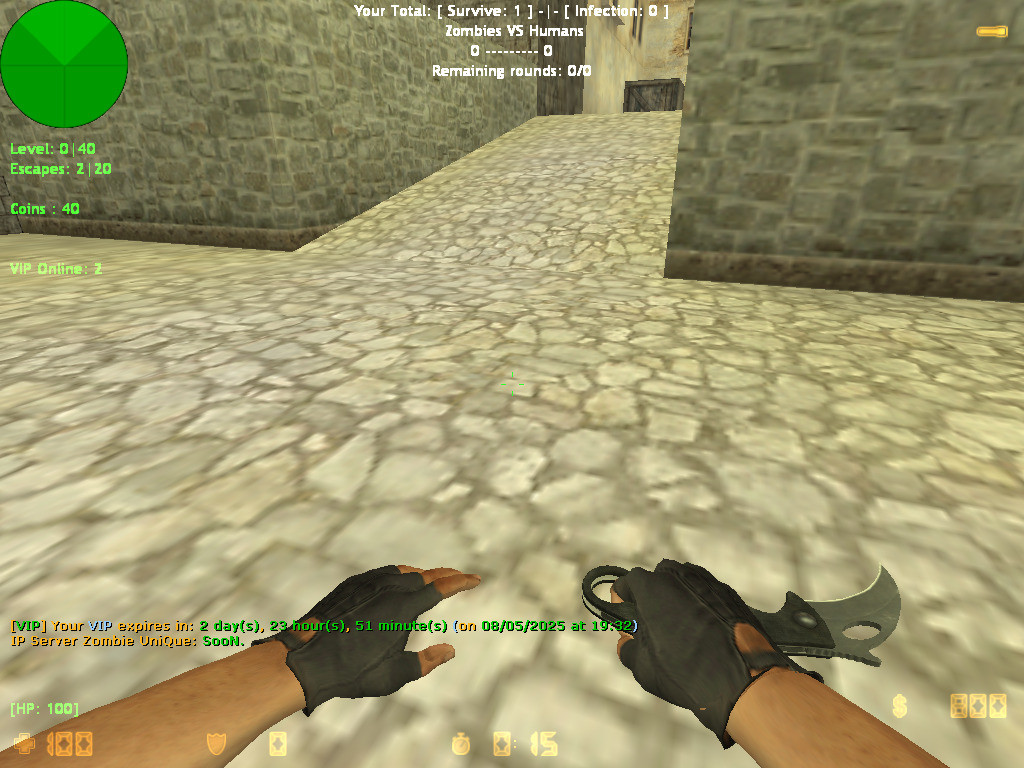 Auto VIP Plugin for CS 1.6 – Reward Players Based on Playtime
Looking to build a loyal community on your Counter-Strike 1.6 server? The Auto VIP Reward Pluginis the ultimate solution. This smart AMX Mod X plugin automatically grants temporary VIP status to players who dedicate their time to your server. No more manual promotions—reward loyalty automatically and watch your player retention soar.
How Does the CS 1.6 Auto VIP Plugin Work?
The system is simple and effective:
Tracks Playtime: It monitors how long each player (by SteamID) is actively connected to your CS 1.6 server.
Rewards Loyalty: Once a player reaches the configured playtime goal (e.g., 25 hours), the plugin automatically grants them VIP status.
Temporary Benefits: The VIP reward is time-based (e.g., 3 days). Players keep their status even after disconnecting, as time is saved using the reliable nVault system.
Seamless Management: When the VIP time expires, the flag is automatically removed. The cycle continues, encouraging players to stay active to earn their next reward.
Key Features of the Playtime VIP System
✅ Automatic Playtime Tracking: Accurately logs minutes played for every SteamID.
✅ Smart VIP Granting: Awards a configurable VIP flag (o by default) once the playtime requirement is met.
✅ Persistent Data: Saves both total playtime and remaining VIP time using nVault, so progress is never lost.
✅ Fully Configurable: Server admins have full control via CVARs and RCON commands.
✅ Player Command: Users can type /viptime in chat to check their current playtime or VIP time remaining.
✅ Colorful Notifications: Uses green (!g), team (!t), and yellow (!y) chat messages to announce VIP rewards and status updates.
✅ Announcement System: Can broadcast motivational messages to non-VIPs about the reward system.
Admin Configuration & Commands
Easily tailor the plugin to your server's needs:
📝 CVARs ( Add to amxx.cfg )
vip_playtime_required – Minutes needed to earn VIP (Default: 1500 = 25 hours).
vip_duration – Minutes of VIP status granted (Default: 4320 = 3 days).
g_vip_flag – The admin flag assigned to VIPs (Default: o).
⚙️ Admin RCON Commands:
amx_setviptime <minutes> – Change the required playtime.
amx_setvipduration <minutes> – Change how long VIP lasts.
amx_setvipflag <flag> – Change the VIP access flag.
Why Your CS 1.6 Server Needs This Plugin
Increase Player Retention: Give players a clear, rewarding goal that keeps them coming back.
Automate Community Management: Remove the burden of manual promotions and focus on other aspects of your server.
Encourage Healthy Competition: Players will actively try to reach the playtime milestone, boosting your server's daily activity.
Fair & Transparent System: Everyone understands the rules: play more, earn VIP rewards. It's a fair way to recognize your most dedicated community members.
Installation Requirements
AMX Mod X 1.8.2 or newer
nVault module enabled in modules.ini
Compatibility: Works on all CS 1.6 mods (Zombie, Deathrun, GunGame, etc.)
Reward loyalty and build a thriving community effortlessly. Install the Auto VIP Reward Plugin on your Counter-Strike 1.6 server today and turn your regular players into dedicated VIPs.
Ready to automate your VIP system? Download the plugin now and configure it in minutes!
By CS321 0 -
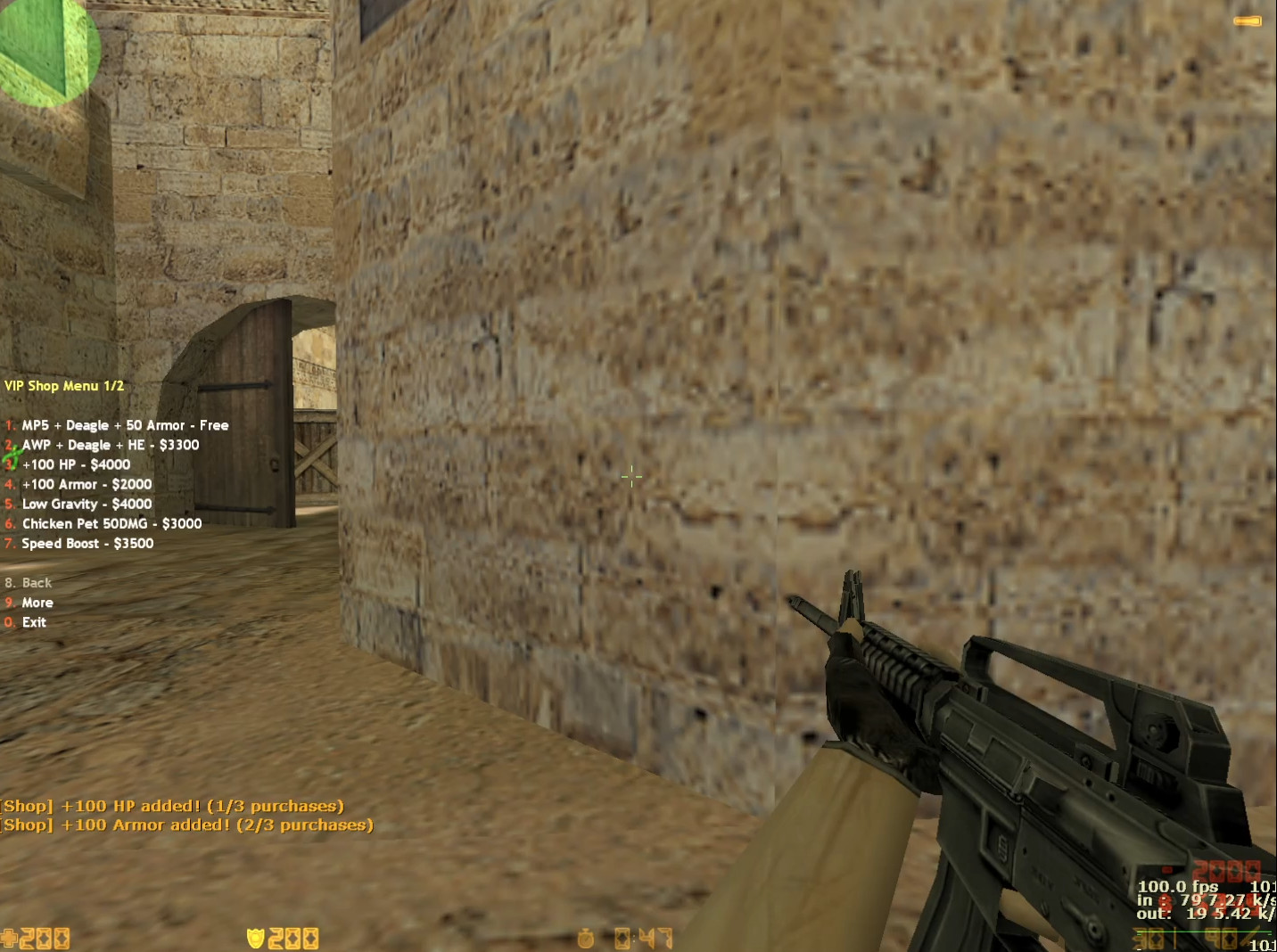 VIP Shop Plugin for CS 1.6 – Exclusive Perks, Weapons & Pets
Looking to enhance your CS 1.6 server with exclusive VIP benefits? This premium VIP Shop pluginadds a custom in-game store where your most loyal players can unlock powerful weapons, unique abilities, and fun upgrades. Designed to reward VIPs without breaking game balance, it’s the perfect addition for any Counter-Strike 1.6 community wanting to offer a special experience.
What is the CS 1.6 VIP Shop Plugin?
This plugin introduces a fully functional, VIP-exclusive shop menu accessible only to players with the proper admin flag (ADMIN_LEVEL_H). VIPs can spend in-game money to purchase temporary boosts, rare weapons, and even summon a combat pet. It’s a proven way to increase server donations, reward active members, and add a fresh layer of strategy to your CS 1.6 gameplay.
Exclusive VIP Features & Upgrades
The shop offers a balanced selection of powerful items:
🎁 Free Starter Pack (For VIPs only, each round)
MP5 + Desert Eagle + 50 Armor
💰 Premium Purchases (Cost in-game $$$)
AWP Sniper Rifle + Deagle + HE Grenade – For dominating long-range.
HP & Armor Boosts – Increase health and armor (capped at 200 HP).
Low Gravity Mode – Jump higher and navigate maps creatively.
Speed Boost – Run at 400 speed for lightning-fast flanks and pushes.
Chicken Pet – Summon an attacking pet that deals 50 damage to enemies.
Double Jump – Jump a second time mid-air for advanced movement and trick jumps.
Smart Balance & Anti-Abuse Systems
To maintain fair gameplay on your CS 1.6 server, the plugin includes built-in limits:
VIP-Only Access: Strictly for players with the ADMIN_LEVEL_H flag.
Purchase Limit: Max 3 items per round to prevent overuse.
Round Reset: All upgrades (except armor) are removed at round start.
Weapon Limit: Players can only hold 1 primary weapon at a time.
Easy Commands & Configuration
Open Shop: VIPs type /vipshop or /vshop in chat.
Enable/Disable: Admins control the plugin via the amx_vipshop CVAR (1 = ON, 0 = OFF).
Simple Installation: Just add the .amxx file to your plugins folder and edit plugins.ini.
Why Install This VIP Shop on Your Server?
Increase Donations/VIP Sales: Offer tangible, fun rewards that players want.
Enhance Gameplay: Adds new tactics and variety without harming core mechanics.
Reward Loyal Players: Give your VIPs a unique, exclusive experience.
Easy to Manage: Plug-and-play setup with configurable options.
Perfect for: Deathrun, Zombie Plague, GunGame, and classic CS 1.6 mods. Boost your server's appeal and give players a reason to support your community.
Ready to install the ultimate VIP system? Download the CS 1.6 VIP Shop plugin today and transform your server into a premium destination.
By CS321 0 -
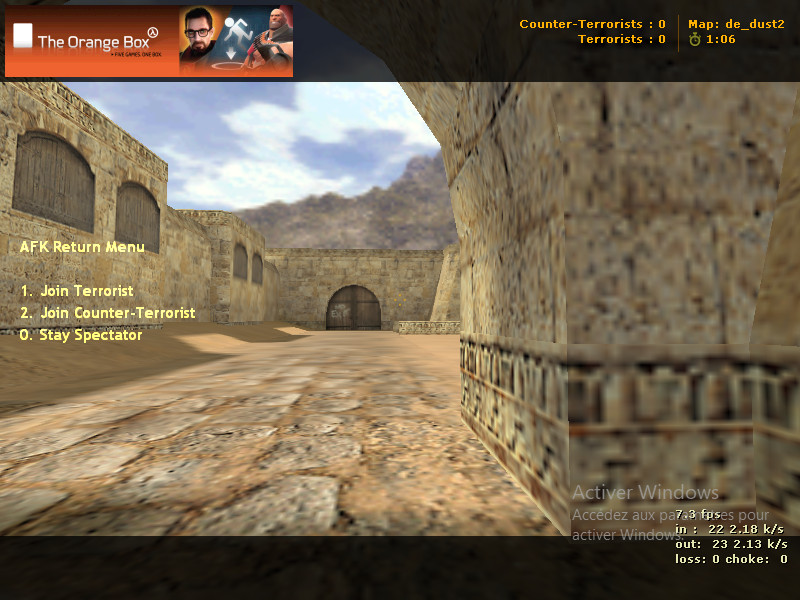 AFK Manager for CS 1.6 – Auto-Spectate & Rejoin Menu Plugin
Tired of AFK players taking up active slots on your CS 1.6 server? This powerful plugin solves the problem automatically. It detects inactive players and moves them to spectator mode, freeing up team slots for active participants. The best part? It includes a smart Rejoin Menu, so AFK players can easily return to the action when they come back.
What This Plugin Does:
Automatically Detects AFK Players: Monitors player movement and aiming. If a player is inactive for a set time (default: 15 seconds), the plugin recognizes them as AFK.
Moves AFK to Spectator: Instantly switches AFK players to the spectator team, keeping the competitive teams free for active combatants.
Provides a Return-to-Game Menu: When an AFK player returns, they get a clear, colorful menu to choose their team: Terrorist, Counter-Terrorist, or Stay as Spectator.
Informs Everyone with Color Messages: The server announces all AFK moves and returns with clear, in-game messages, so everyone knows what’s happening.
Key Features at a Glance:
✅ Smart AFK Detection: Tracks both player movement and view angles for accurate inactivity checks.
✅ Automatic Team Management: Seamlessly moves AFK players to spectator without admin commands.
✅ User-Friendly Rejoin System: Returning players get an intuitive menu to select their preferred team instantly.
✅ Supports All Teams: Works perfectly with Terrorist (T), Counter-Terrorist (CT), and Spectator slots.
✅ Clear Server Notifications: Color-coded messages keep all players informed about AFK status changes.
✅ Fully Configurable: Easily adjust the AFK timer and other settings to match your server's rules.
Why Your CS 1.6 Server Needs This Plugin
An AFK player can ruin a round. They block a team slot, create unfair imbalances, and frustrate active players. This plugin automates server management, ensuring:
Fairer Gameplay: Only active players occupy team slots.
Better Server Performance: Frees up resources and improves the experience for everyone.
Reduced Admin Workload: No need for manual amx_kick or amx_spec commands.
Installation & Commands
Installation is Simple:
Download the compiled Auto-SpectatorSystem.amxx file.
Place it in your addons/amxmodx/plugins/ folder.
Add Auto-SpectatorSystem.amxx to your plugins.ini file.
Restart or change map on your server.
Main Command:
Players can manually open the team selection menu by typing: /afkmenu
Plugin Info:
Current Version: v1.0
Author: ITS_ZAKI
Compatibility: AMX Mod X 1.8.1+ | All CS 1.6 Mods
Keep your CS 1.6 server competitive, fair, and full of active players. Download the AFK Manager plugin today and automate your team management effortlessly.
By CS323 0 -
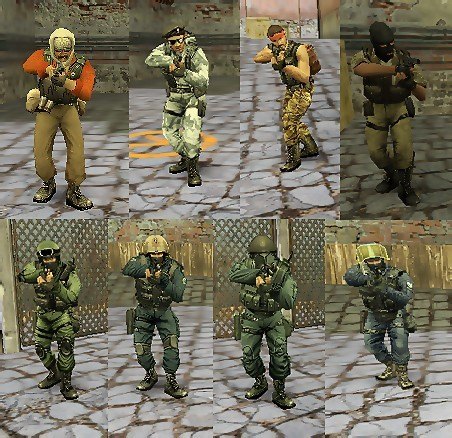 Classic CS 1.6 Player Models: The Official Steam Pack
Tired of custom skins? Want the real, gritty look of the original Counter-Strike? This pack delivers exactly that: the untouched, official player models straight from Valve's Steam version of CS 1.6. These are the characters that defined a genre.
This collection is for purists, classic server admins, and players who value authenticity over flashy edits. Everything is preserved exactly as it was.
Complete List of Original In-Game Teams:
Counter-Terrorists (4 Original Forces):
SEAL Team 6 (United States Navy)
GSG-9 (German Grenzschutzgruppe 9)
SAS (British Special Air Service)
GIGN (French National Gendarmerie Intervention Group)
Terrorists (4 Original Factions):
Phoenix Connexion (Eastern European Terrorists)
Elite Crew (The iconic "Leet" Crew)
Arctic Avengers (Winter Combat Specialists)
Guerilla Warfare (Middle Eastern Militants)
That's the full, correct roster: 4 CT teams and 4 T teams – all eight original factions from the classic game.
Why Choose This Pack?
100% Authentic: Direct files from the Steam version. No modifications.
Complete Collection: Every single default player model for CT and T sides.
Easy Installation: Drag and drop into your cstrike folder.
Restores the Classic Feel: Perfect for servers that want the genuine CS 1.6 experience.
Quick Installation Guide:
Download the ZIP file.
Extract the models folder.
Copy it into your main cstrike directory.
Launch the game. The classic characters are back.
Download the complete, original player models below and restore the true look of Counter-Strike 1.6.
By CS323 0 -
 Skin Pack from the "Dust 2 2021" Collection for CS 1.6
A skin pack from the "Dust 2 2021" collection, released alongside the Operation Riptide on September 22, 2021. No inspect animation.
AK-47 | Gold Arabesque
UMP-45 | Gradient
SSG 08 | Death's Sting
USP-S | Orange Anole
MAC-10 | Case-Hardened
M4A4 | Red Pixel Camo
Galil AR | Amber Gradient
P250 | Black & Tan
Nova | Quicksand
G3SG1 | New Roots
AUG | Ancient Wood
Five-SeveN | Withered Vine
MP9 | Old Roots
M249 | Midnight Palm
SG 553 | Whiteness
MP7 | Sacrifice
Sawed-Off | Drought
P90 | Desert Pixel Camo
Category: Weapons / Weapon Packs
Release Date: 2021
Collection: Ported from CS:GO
Inspect Animation: No
By CS321 0 -
 Plugin Name: Steam Slot Manager
Description: Automatically provides guaranteed server access to players with verified Steam accounts. Simply type /steam in chat to activate your reserved slot.
Author: kidd0x
Version: 1.0
✅ Quick Installation (Plugin Already Compiled)
Download the steam_slot.amxx file
Place the plugin on your server
Copy the steam_slot.amxx file to the directory:
addons/amxmodx/plugins/ Activate the plugin
Open the file:
addons/amxmodx/configs/plugins.ini Add the line:
steam_slot.amxx Restart your server
Restart the server to load the new plugin.
Verify it's working
Join the server and type in chat:
/steam Or use the command in the server console:
amxx plugins Look for:
steam_slot.amxx Running 🎮 How It Works
For Steam Players:
Type /steam in chat to activate your reserved slot. If the server is full, they will receive priority access.
For Non-Steam Players:
Can only join if there are free slots. When the server is full, they will be kicked to make room for players with a valid Steam account.
⚙️ Advanced Configuration
To customize plugin messages:
Create the file steam_slot.txt in:
addons/amxmodx/data/lang/ Add lines like:
[en] STEAM_ACTIVATED = Your Steam slot is now active! STEAM_KICK = A non-Steam player was removed for a Steam user. 📊 Compatibility
✔ Works on any server with AMX Mod X 1.8.1+
✔ Does not interfere with other reserved slot plugins
✔ Supports all CS 1.6 mods (Zombie, Deathrun, etc.)
⚠️ Important Notes
The plugin only recognizes valid Steam accounts (with the format STEAM_0:X:XXXXXX).
Players with IP-based or non-Steam accounts cannot use the /steam command.
No additional compilation or scripting is required.
By CS320 0 -
 Accuracy Fix – The Ultimate Precision Upgrade for CS 1.6 Weapons
Plugin Name: Accuracy Fix
Plugin Overview:
The Accuracy Fix plugin solves a critical yet often overlooked bug in Counter-Strike 1.6 related to weapon accuracy. In the default game, weapon precision is determined using timing data from the previous shot rather than the actual delay between shots. This leads to inconsistent bullet spread, unpredictable aim, and frustrating hit registration.
By installing this plugin, weapons behave more realistically—with smoother recoil patterns and far more reliable accuracy, making gunfights fairer and more skill-based.
✅ Core Improvements & Features
Bug Fixes & Corrections
✔ Fixed Bullet-Timing Glitch: No longer uses previous shot data for accuracy calculation.
Weapon Accuracy Upgrades
✔ Smooth Automatic Fire: Removes jittery spread during sustained fire.
✔ FPS-Independent Spread Recovery: Fixes accuracy cooldown issues on low-FPS systems.
✔ Glock Burst-Fire Fix: Improved precision in both moving and stationary burst mode.
✔ Enhanced Static Accuracy: Better precision while standing or crouching.
✔ SG550 Precision Boost: Significant accuracy improvement for this scoped rifle.
✔ Scout Standing Accuracy: More reliable accuracy when firing the Scout without scoping.
🎮 Why Install This Plugin?
✔ Predictable Shooting Mechanics: Bullets land where you aim.
✔ Fair Gameplay: Reduces random inaccuracies during combat.
✔ Smoother Weapon Handling: Improves overall feel and control.
✔ Competitive Advantage: Especially useful for leagues and match servers.
📥 How to Install
Step 1 – Upload the file
Copy the plugin file:
accuracy_fix.amxx to your server folder:
addons/amxmodx/plugins/ Step 2 – Activate the plugin
Open the plugins configuration file:
addons/amxmodx/configs/plugins.ini and add this line:
accuracy_fix.amxx Step 3 – Restart your server
Apply changes by restarting the CS 1.6 server.
Step 4 – Verify activation
In the game console, enter:
amxx plugins Look for the line:
accuracy_fix.amxx Running to confirm successful installation.
📌 Important Note
This plugin does not change weapon recoil patterns. It strictly fixes accuracy and bullet spread calculations, ensuring a consistent and authentic shooting experience.
By CS3225 0
-
New Counter-Strike 1.6
-
Blogs
-

 Latest Entry
Download CS 1.6 ESWC

Download CS 1.6 ESWC Edition — Competitive Counter-Strike 1.6 for PC
The Electronic Sports World Cup experience: optimized models, improved textures, and low-ping config — free for Windows 10 & 11.
🛡️ Antivirus Scanned ✅ Trusted & Verified 🔒 100% Safe 🚫 No Malware ⚡ Clean Build🛡️ ANTIVIRUS SCANNED & TRUSTED — 100% SAFE
⚠️ Note: The CS 1.6 ESWC Edition has been fully tested and scanned with the latest antivirus technology. During installation, you may encounter a Windows SmartScreen prompt — this is a standard Windows notification for less common files and can be safely ignored.
Below is a step-by-step installation tutorial:
What is CS 1.6 ESWC Edition?
CS 1.6 ESWC is a special edition of the legendary Counter-Strike 1.6, built for players who want to experience the atmosphere of professional ESWC (Electronic Sports World Cup) competitions. This version keeps the original gameplay mechanics intact while adding visual and performance improvements that make it ideal for both practice and serious matches.
Compared to the classic release, CS 1.6 ESWC includes optimized player models, improved textures for weapons and maps, and a modernized GUI that follows competitive standards. The default configuration is also tuned for low ping and stable FPS, giving you a clear edge in online battles.
Why Download CS 1.6 ESWC?
🎯 ESWC Competitive GUI
Modernized interface following international tournament standards.
🧍 Optimized Player Models
Refined Terrorist and CT skins for maximum visibility.
🔫 Improved Textures
Higher quality weapon & map visuals without sacrificing FPS.
📡 Low-Ping Config
Pre-tuned rate, cl_cmdrate and cl_updaterate values.
⚡ Stable FPS
Optimized for 100+ FPS on widescreen (16:9, 16:10).
🛡️ Anti-Slowhack
Full read-only protection against rogue server scripts.
🤖 Integrated zBots
Practice offline against AI bots with adjustable difficulty.
🌐 Working Masterserver
Browse thousands of ESWC-style servers worldwide.
Download CS 1.6 ESWC
Choose your preferred download method
Build: ESWC Competitive Edition · Size: ~260 MB · 100% Virus-Free
Technical Specifications
Gallery — CS 1.6 ESWC in Action
Authentic gameplay screenshots showing the ESWC red/blue player models, competitive maps, and modernized interface:
ESWC-style red and blue player models optimized for competitive visibility.
Classic competitive gameplay with ESWC optimized textures.
Modernized ESWC GUI following international competitive standards.
ESWC vs. Classic CS 1.6
System Requirements
Recommended Console Commands
For optimal hit registration on ESWC-style servers, open the console (
~) and apply:rate 100000 cl_cmdrate 105 cl_updaterate 102 ex_interp 0.01 fps_max 99.5 m_rawinput 1 cl_crosshair_size "medium" cl_crosshair_color "0 255 0"
How to Install CS 1.6 ESWC — Step by Step
- Download: Click the Direct Download (.exe) or the Torrent Download (.torrent) link.
- Run Setup: Open the downloaded file to launch the setup wizard.
-
Choose Path: Select your preferred folder (e.g.,
C:\Games\CS16_ESWC). - Desktop Shortcut: Keep the checkbox checked for fast access.
- Play: Launch the game, set your resolution under Options > Video, and join your favorite ESWC servers.
Frequently Asked Questions
Is CS 1.6 ESWC free to download?
Yes, this release is 100% free to download, install, and play both online and offline.
What makes ESWC different from classic CS 1.6?
The ESWC Edition includes optimized player models, improved textures, a modernized GUI, and a competitive low-ping configuration — all while keeping the original gameplay mechanics intact.
Can I play on regular CS 1.6 servers?
Yes! The client supports Dual Protocol 47/48, so you can connect to both ESWC-style and standard public servers.
Is this version safe from malware?
Absolutely. The client is clean, virus-checked, and fortified with read-only file protection against malicious server scripts.
Ready to Play CS 1.6 ESWC?
Download now and experience the tournament atmosphere.
- Read more...
- 0 comments
-