Classic CS 1.6 Player Models: The Official Steam Pack
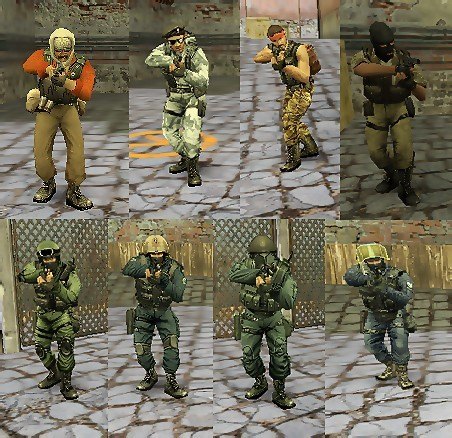
Tired of custom skins? Want the real, gritty look of the original Counter-Strike? This pack delivers exactly that: the untouched, official player models straight from Valve's Steam version of CS 1.6. These are the characters that defined a genre.
This collection is for purists, classic server admins, and players who value authenticity over flashy edits. Everything is preserved exactly as it was.
Complete List of Original In-Game Teams:
Counter-Terrorists (4 Original Forces):
SEAL Team 6 (United States Navy)
GSG-9 (German Grenzschutzgruppe 9)
SAS (British Special Air Service)
GIGN (French National Gendarmerie Intervention Group)
Terrorists (4 Original Factions):
Phoenix Connexion (Eastern European Terrorists)
Elite Crew (The iconic "Leet" Crew)
Arctic Avengers (Winter Combat Specialists)
Guerilla Warfare (Middle Eastern Militants)
That's the full, correct roster: 4 CT teams and 4 T teams – all eight original factions from the classic game.
Why Choose This Pack?
100% Authentic: Direct files from the Steam version. No modifications.
Complete Collection: Every single default player model for CT and T sides.
Easy Installation: Drag and drop into your cstrike folder.
Restores the Classic Feel: Perfect for servers that want the genuine CS 1.6 experience.
Quick Installation Guide:
Download the ZIP file.
Extract the models folder.
Copy it into your main cstrike directory.
Launch the game. The classic characters are back.
Download the complete, original player models below and restore the true look of Counter-Strike 1.6.
Skin Pack from the "Dust 2 2021" Collection for CS 1.6
A skin pack from the "Dust 2 2021" collection, released alongside the Operation Riptide on September 22, 2021. No inspect animation.
AK-47 | Gold Arabesque
UMP-45 | Gradient
SSG 08 | Death's Sting
USP-S | Orange Anole
MAC-10 | Case-Hardened
M4A4 | Red Pixel Camo
Galil AR | Amber Gradient
P250 | Black & Tan
Nova | Quicksand
G3SG1 | New Roots
AUG | Ancient Wood
Five-SeveN | Withered Vine
MP9 | Old Roots
M249 | Midnight Palm
SG 553 | Whiteness
MP7 | Sacrifice
Sawed-Off | Drought
P90 | Desert Pixel Camo
Category: Weapons / Weapon Packs
Release Date: 2021
Collection: Ported from CS:GO
Inspect Animation: No

Plugin Name: Steam Slot Manager
Description: Automatically provides guaranteed server access to players with verified Steam accounts. Simply type /steam in chat to activate your reserved slot.
Author: kidd0x
Version: 1.0
✅ Quick Installation (Plugin Already Compiled)
Download the steam_slot.amxx file
Place the plugin on your server
Copy the steam_slot.amxx file to the directory:
addons/amxmodx/plugins/
Activate the plugin
Open the file:
addons/amxmodx/configs/plugins.ini
Add the line:
steam_slot.amxx
Restart your server
Restart the server to load the new plugin.
Verify it's working
Join the server and type in chat:
/steam
Or use the command in the server console:
amxx plugins
Look for:
steam_slot.amxx Running
🎮 How It Works
For Steam Players:
Type /steam in chat to activate your reserved slot. If the server is full, they will receive priority access.
For Non-Steam Players:
Can only join if there are free slots. When the server is full, they will be kicked to make room for players with a valid Steam account.
⚙️ Advanced Configuration
To customize plugin messages:
Create the file steam_slot.txt in:
addons/amxmodx/data/lang/
Add lines like:
[en]
STEAM_ACTIVATED = Your Steam slot is now active!
STEAM_KICK = A non-Steam player was removed for a Steam user.
📊 Compatibility
✔ Works on any server with AMX Mod X 1.8.1+
✔ Does not interfere with other reserved slot plugins
✔ Supports all CS 1.6 mods (Zombie, Deathrun, etc.)
⚠️ Important Notes
The plugin only recognizes valid Steam accounts (with the format STEAM_0:X:XXXXXX).
Players with IP-based or non-Steam accounts cannot use the /steam command.
No additional compilation or scripting is required.

Accuracy Fix – The Ultimate Precision Upgrade for CS 1.6 Weapons
Plugin Name: Accuracy Fix
Plugin Overview:
The Accuracy Fix plugin solves a critical yet often overlooked bug in Counter-Strike 1.6 related to weapon accuracy. In the default game, weapon precision is determined using timing data from the previous shot rather than the actual delay between shots. This leads to inconsistent bullet spread, unpredictable aim, and frustrating hit registration.
By installing this plugin, weapons behave more realistically—with smoother recoil patterns and far more reliable accuracy, making gunfights fairer and more skill-based.
✅ Core Improvements & Features
Bug Fixes & Corrections
✔ Fixed Bullet-Timing Glitch: No longer uses previous shot data for accuracy calculation.
Weapon Accuracy Upgrades
✔ Smooth Automatic Fire: Removes jittery spread during sustained fire.
✔ FPS-Independent Spread Recovery: Fixes accuracy cooldown issues on low-FPS systems.
✔ Glock Burst-Fire Fix: Improved precision in both moving and stationary burst mode.
✔ Enhanced Static Accuracy: Better precision while standing or crouching.
✔ SG550 Precision Boost: Significant accuracy improvement for this scoped rifle.
✔ Scout Standing Accuracy: More reliable accuracy when firing the Scout without scoping.
🎮 Why Install This Plugin?
✔ Predictable Shooting Mechanics: Bullets land where you aim.
✔ Fair Gameplay: Reduces random inaccuracies during combat.
✔ Smoother Weapon Handling: Improves overall feel and control.
✔ Competitive Advantage: Especially useful for leagues and match servers.
📥 How to Install
Step 1 – Upload the file
Copy the plugin file:
accuracy_fix.amxx
to your server folder:
addons/amxmodx/plugins/
Step 2 – Activate the plugin
Open the plugins configuration file:
addons/amxmodx/configs/plugins.ini
and add this line:
accuracy_fix.amxx
Step 3 – Restart your server
Apply changes by restarting the CS 1.6 server.
Step 4 – Verify activation
In the game console, enter:
amxx plugins
Look for the line:
accuracy_fix.amxx Running
to confirm successful installation.
📌 Important Note
This plugin does not change weapon recoil patterns. It strictly fixes accuracy and bullet spread calculations, ensuring a consistent and authentic shooting experience.


 Skin Pack from the "Dust 2 2021" Collection for CS 1.6