


.thumb.jpg.f05464b89d1d0f9c37a489369eef463f.jpg)
.thumb.jpg.3aa7d50c9e332bd4d0a9ed51c17ad93f.jpg)
About This File
Bomb Site Control – v1.3
Description
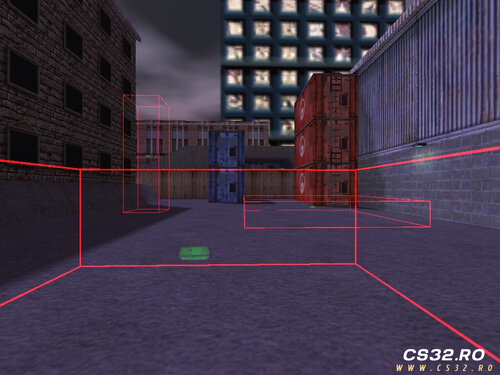
Bomb Site Control gives server administrators full control over bomb sites in real time. You can create, remove, enable, or disable bomb sites during gameplay without modifying map files.
All custom bomb site locations and settings are saved automatically and loaded on every map start, ensuring consistent behavior across maps.
The plugin includes a configuration file:
configs/BombSite.ini
This file allows you to manage key options such as:
-
Enabling bomb sites on all maps (not only de_ maps)
-
Controlling radar visibility of bomb sites
-
General bomb site behavior and display settings
Commands
| Command | Description |
|---|---|
say /bs
|
Opens the Bomb Site menu |
say_team /bs
|
Opens the Bomb Site menu |
say /bombsite
|
Opens the Bomb Site menu |
say_team /bombsite
|
Opens the Bomb Site menu |
bs_reload
|
Reloads the configuration file |
bombsite_reload
|
Reloads the configuration file |
Key Features
-
Create bomb sites dynamically during gameplay
-
Remove or toggle bomb sites in real time
-
Persistent bomb site storage per map
-
Automatic loading on map start
-
Bomb sites usable on any map or game mode
-
Custom radar visibility control per team
-
Visual bomb site indicators using C4 HUD sprites
Changelog
v1.0
-
Initial release
v1.1
-
Optimized code for better performance
-
Bomb sites can be expanded without being blocked by map geometry
-
Replaced decal drawing with a C4 HUD sprite for clearer indication
-
Enabled plantable C4 on all maps and modes
v1.2
-
Bomb site sprite color now reflects site state
-
Radar visibility can be configured for:
-
Terrorists
-
Counter-Terrorists
-
Both teams
-
Disabled
-
v1.3
-
Added independent axis scaling for precise site resizing
-
Added Add / Remove mode toggle for better control
-
Introduced scaling factor control for fine adjustments
-
Added noclip mode for easier bomb site placement
Download
Bomb Site Control v1.3